
How to Import SHEIN Products to WooCommerce in 2026

On this page
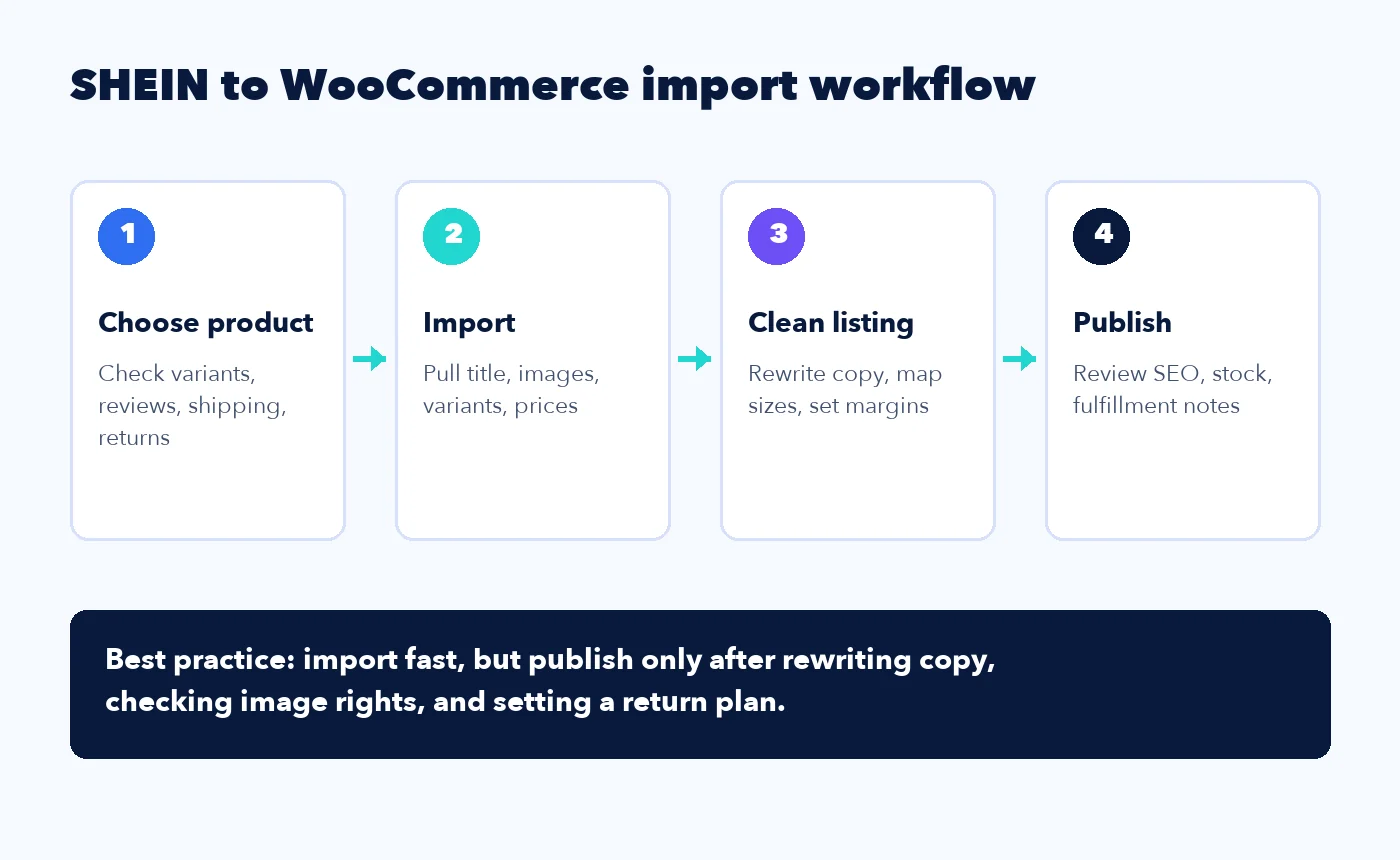
If you want to import SHEIN products to WooCommerce in 2026, treat it as a policy-sensitive product-research workflow first, not as an officially approved SHEIN dropshipping program. The cleanest approach is to choose the product on SHEIN, import the listing into a draft, rewrite it for your own store, map the fashion variants carefully, and publish only after checking commercial-use permission, shipping, returns, pricing, image rights, and trademark risk. Importify can technically import SHEIN product data into WooCommerce, but that technical capability is not the same thing as SHEIN granting resale, dropshipping, or content-use permission.
For merchants who still want to evaluate the workflow after reviewing the policy and IP risks, start with Importify's dedicated SHEIN product importer. It is built for importing SHEIN product details, images, variants, descriptions, and pricing into Shopify, Wix, WooCommerce, BigCommerce, and Jumpseller for review and editing. This guide focuses on the WooCommerce side: how to prepare your store, what to inspect before importing, how to avoid unsafe copy-paste publishing, and how to handle the common question, "Is dropshipping from SHEIN allowed?"
What is a SHEIN to WooCommerce integration?
A SHEIN to WooCommerce integration is a workflow that moves product information from a SHEIN product page into your WooCommerce catalog, then lets you edit and publish the product from WordPress. The best version of the workflow imports the raw listing quickly, but still leaves you in control of the final product title, description, size options, pricing, images, SEO fields, and fulfillment notes.
That distinction matters. A product importer is not a substitute for supplier judgment. SHEIN has a huge catalog, fast-moving fashion trends, many color and size variants, and product pages that are written for SHEIN's own marketplace. Your WooCommerce store needs a different job done. It needs product pages that explain fit, materials, shipping expectations, returns, and value in your brand voice.
WooCommerce gives you several ways to add products. Its built-in CSV importer can import products, attributes, categories, and images in bulk, and the official WooCommerce REST API can create, read, update, and delete store data through authenticated JSON requests. Those are useful for migrations and custom development. For a merchant browsing SHEIN product pages and testing a fashion catalog, a browser-based importer is usually faster because it starts from the live supplier page rather than a spreadsheet you have to build by hand.
When should you evaluate SHEIN products for WooCommerce?
Consider importing SHEIN products into WooCommerce drafts when you want to research fashion, accessories, or trend-led products quickly, but still want the flexibility of a WordPress-owned store. WooCommerce is a good fit when you care about content control, SEO flexibility, plugin choice, and owning more of the storefront experience.
SHEIN can be attractive for fashion research because it has a constantly refreshed catalog and many low-ticket items. That is also the risk. Products move fast, variants can disappear, quality can vary, and the original product page may not give you all the detail a customer expects from an independent store. A weak import workflow creates a copy-paste store. A stronger workflow uses SHEIN as a product discovery input, then publishes only products you can support with rights-cleared content, honest shipping promises, and a defensible sourcing plan.
This article is most useful if you are doing one of these jobs:
- Building a WooCommerce fashion store and researching product ideas before committing to inventory.
- Adding a small trend-led collection to an existing ecommerce store.
- Comparing SHEIN with other supported supplier marketplaces before choosing a sourcing mix.
- Moving from manual copy-and-paste product creation to a faster import and cleanup workflow.
- Trying to avoid generic product pages that look identical to supplier listings.
If you are still choosing a platform, read Importify's broader guide to importing products to WooCommerce. If you already know WooCommerce is your store platform, the rest of this guide is about the SHEIN-specific decisions.
Is dropshipping from SHEIN allowed?
Dropshipping from SHEIN sits in a gray area unless you have permission that clearly covers your use case. WooCommerce does not ban dropshipping as a store model, and Importify can help you import SHEIN product data into WooCommerce, but SHEIN's U.S. consumer terms say its services are licensed for personal, non-commercial shopping unless SHEIN explicitly permits otherwise in advance.
That means you should not publish a blanket claim like "SHEIN officially supports dropshipping" unless you have a separate seller, partner, or permission arrangement that says so. The safer answer is more precise: merchants can use tools to import SHEIN product information, but they remain responsible for commercial use, intellectual property, image rights, trademark use, customer disclosures, returns, and any other policy obligations.
The key source is SHEIN's own terms. The SHEIN U.S. Terms of Use state that use of the services is for personal, non-commercial shopping and not for commercial use or use on behalf of a third party unless explicitly permitted in advance. The same terms also restrict commercial use of information from the services and prohibit content that violates intellectual property rights. That does not mean every resale scenario is automatically illegal in every country, and it is not legal advice. It does mean a WooCommerce merchant should treat unsupported dropshipping from SHEIN as a high-caution workflow, not as an official supplier partnership.
There are four practical rules:
- Do not imply your store is SHEIN, endorsed by SHEIN, or officially partnered with SHEIN unless that is true.
- Do not blindly reuse marketplace copy, model photos, brand names, or designs where you do not have the rights to use them.
- Do not treat imported images or descriptions as safe for commercial use just because a tool can move them into WooCommerce.
- Do not sell products you cannot support with clear shipping, return, sizing, and customer service policies.
Importify is not affiliated with SHEIN and does not speak for SHEIN. Importify provides a product-import tool, but the seller is responsible for commercial-use permission, intellectual-property checks, trademark checks, image rights, product claims, and customer policies. Use automation to save time, then slow down at the legal and customer-experience checkpoints.
What should you check before importing a SHEIN product?
Before importing a SHEIN product, check whether the item is suitable for your customer, profitable after all costs, and safe to publish under your own store brand. The product page may look simple, but fashion listings usually hide the hardest ecommerce problems: fit, returns, photography rights, color variation, and customer expectations.
Use this quick pre-import screen:
- Demand: Is this product part of a visible trend, a recurring category, or a collection your audience already buys?
- Variants: Are the sizes and colors clear enough to map into WooCommerce without confusing shoppers?
- Images: Can you legally and safely use the photos, or do you need to order a sample and create your own product media?
- Shipping: Can the delivery estimate support your advertised shipping promise?
- Returns: Is the category returnable, and can you handle customer returns even if the supplier process is slow?
- Margin: Does the price still work after shipping, payment fees, ad costs, returns, and customer support time?
- Brand risk: Does the item resemble a protected brand, character, artwork, logo, or designer product?
The return check deserves special attention. SHEIN's U.S. return policy says most items may be returned within 30 days from delivery, with exceptions for non-returnable categories and condition requirements. Your WooCommerce return policy should not promise more than you can realistically absorb. If you sell apparel, expect size-related returns. If you sell final-sale categories, make those limits visible before checkout.
For product selection strategy beyond SHEIN, use Importify's guide to finding winning dropshipping products. It is better to reject five weak products before import than to publish them and deal with support problems later.
How do you prepare WooCommerce product listings before importing?
Prepare WooCommerce by setting up your product structure before any supplier import. A clean catalog needs categories, attributes, shipping classes, tax settings, payment settings, image rules, and a clear naming convention before products start entering your store.
At minimum, set up these WooCommerce basics:
- Categories: Create clear fashion categories such as Dresses, Tops, Bottoms, Accessories, Activewear, or Swimwear.
- Attributes: Standardize attributes such as Size, Color, Material, Pattern, Fit, Sleeve Length, and Occasion.
- Shipping classes: Group products by shipping promise or fulfillment cost when needed.
- SKU rules: Decide how imported SKUs will be named so you can track supplier, product, and variant.
- Draft workflow: Import products as drafts first, then publish only after cleanup and rights review.
- Return policy: Write a policy that matches the real risk of your category, especially sizing, supplier returns, and final-sale limits.
WooCommerce's CSV schema shows why this setup matters. The official product import schema includes product type, SKU, name, stock, pricing, categories, tags, images, parent products, attributes, and variation fields. If you import fashion products without a naming system, you quickly end up with duplicate colors, inconsistent size labels, and product pages that are hard to filter.
For SHEIN specifically, apply a stricter filter after the WooCommerce structure is ready. Treat imported products as drafts, check whether the product page has usable measurements, avoid claims you cannot verify, and do not assume supplier images or descriptions are cleared for your commercial use.
Fashion stores should also create a reusable size guide before importing many items. SHEIN listings may have product-specific measurements, international size labels, and customer review notes about fit. WooCommerce can display size information, but you need a consistent way to explain it. For apparel, do not rely only on "S, M, L." Add measurement guidance, fit notes, and a customer support route for sizing questions.
How do you import SHEIN products to WooCommerce with Importify?
To import SHEIN products to WooCommerce with Importify, connect your WooCommerce store, install the browser extension, open the SHEIN product page, click the Importify import button, review the imported product data, and publish only after editing the listing. The import step is fast. The cleanup step is where your store becomes different from the supplier page.
A practical workflow looks like this:
- Connect WooCommerce to Importify. Make sure your WooCommerce store is connected and ready to receive products.
- Install the Importify Chrome extension. The extension lets you work from the supplier product page instead of copying data manually.
- Open the SHEIN product page. Review the product, images, variants, shipping expectations, reviews, and category fit.
- Click Import. Importify can pull product details, images, variants, descriptions, and pricing into your store workflow for review.
- Edit before publishing. Rewrite the title and description, clean variant names, adjust pricing, and use only images and claims you have the right to publish commercially.
- Publish to WooCommerce. Push the final product to WooCommerce only after the product page is customer-ready and rights-reviewed.
Importify supports 25+ supplier marketplaces and the five destination platforms listed in the Importify canonical product facts: Shopify, Wix, WooCommerce, BigCommerce, and Jumpseller. For SHEIN specifically, the important Importify features are One-Click Import, Product Customization, Smart Pricing Rules, AI Product Optimizer on Premium and Gold, One-Click Translation on Premium and Gold, and Supplier Override if you later want to switch the source behind an existing product while preserving the product URL.
If you plan to test many SHEIN products, build a draft-first routine. Import products in batches, but review them one by one. A store with ten polished, rights-reviewed fashion products is stronger than a store with one hundred unedited supplier copies.
How should you clean up SHEIN product titles and descriptions?
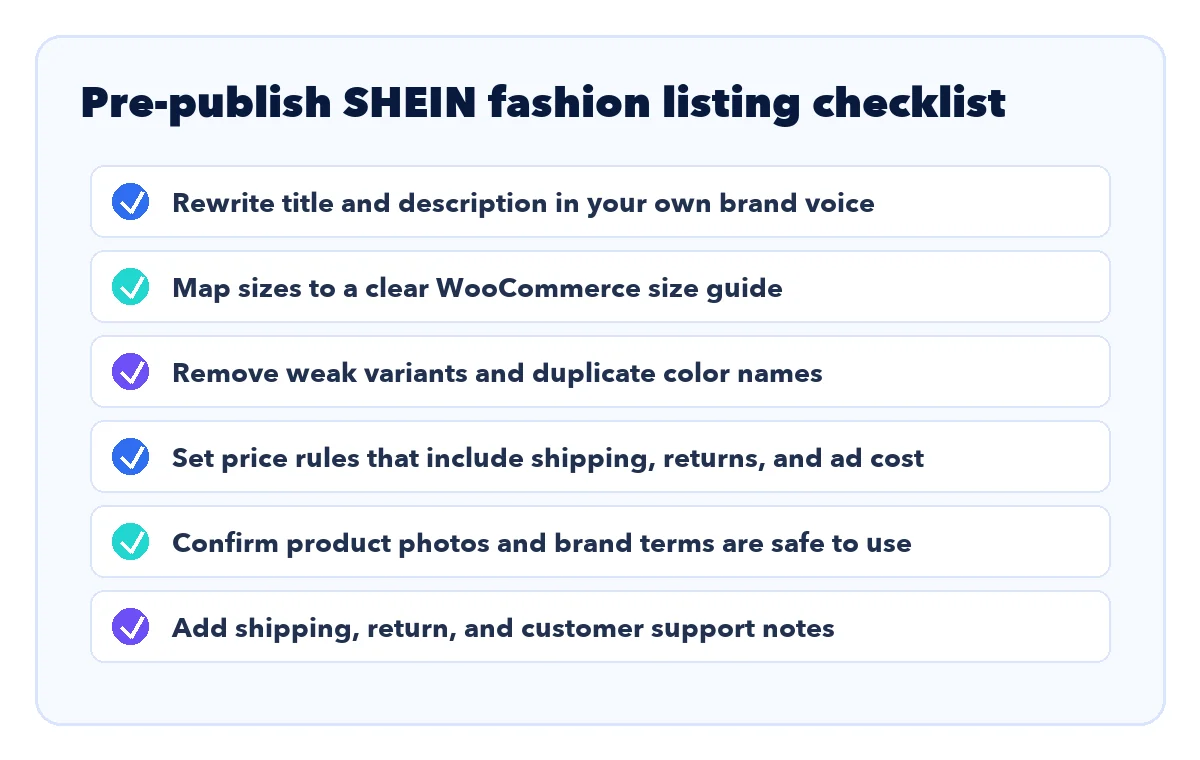
Clean up SHEIN product titles and descriptions by rewriting them for search intent, customer clarity, and brand trust. Do not publish the supplier title and description unchanged. It is weak for SEO, weak for conversion, and riskier when the original page includes marketplace wording you do not control.
A better WooCommerce product title usually includes product type, core feature, customer use case, and one differentiator. For example, a raw marketplace-style title might be long, repetitive, and keyword-heavy. Your store title should be simpler: "Ribbed Long Sleeve Midi Dress for Everyday Layering" or "Lightweight Floral Kimono Cover-Up for Summer Outfits." The title should sound like your store, not a scraped feed.
The description should answer the questions customers ask before buying fashion online:
- What does it feel like?
- How does it fit?
- What can it be worn with?
- What body, occasion, or season is it best for?
- What should customers know about sizing?
- How long does shipping usually take?
- What is the return path if the fit is wrong?
Importify's AI Product Optimizer, available on Premium and Gold, can help rewrite product titles and descriptions using Importify's own OpenAI account. Use that as an editing accelerator, not as a replacement for review. For fast-fashion products, you should still inspect measurements, materials, and photos before publishing.
How should you handle fashion sizes, colors, and variants in WooCommerce?
Handle fashion variants by simplifying them into clean WooCommerce attributes that shoppers can understand. Any supplier feed can contain too many color names, inconsistent size labels, and weak image combinations. If you import everything without review, your product page can become cluttered and confusing.
Start with size. Keep one main size attribute, usually Size, and map supplier sizes into your store's naming convention. If the product has measurements, include them in a size guide or product description. If reviews suggest the item runs small or large, mention that carefully without overpromising. Do not invent fit data if the source does not support it.
Then review color. Supplier color labels are often inconsistent. One product might use "Khaki," another "Apricot," another "Coffee Brown," and another "Camel." You can preserve useful distinctions, but keep labels customer-friendly. If two variants look almost identical, consider removing one from the published product. Too many nearly identical options can reduce confidence.
For SHEIN products, be extra careful with size and image mapping because fast-fashion listings can change quickly. If a variant image, size measurement, or color claim is unclear, keep that variant out of the published product until you can verify it.
Finally, check variant images. Each important color should have a matching image. If the imported image set is incomplete, either remove the weak variant or add your own image after ordering a sample. For clothing, image clarity affects both conversion and returns. A customer who cannot understand color, length, and fit before checkout is more likely to contact support or return the product.
How should you price imported fashion products?
Price imported fashion products by calculating landed cost, return risk, ad cost, payment fees, and customer support, not just by adding a flat markup to the supplier price. Low-cost fashion products can look profitable until you include shipping, failed deliveries, refunds, discounting, and the time spent answering sizing questions.
A simple pricing model is:
- Supplier item cost: The product price you pay at the time of order.
- Shipping cost: Any shipping you absorb or pass to the customer.
- Payment fees: Card, PayPal, or other payment processing costs.
- Ad cost: The estimated cost to acquire a sale.
- Return allowance: A buffer for apparel returns, refunds, and support.
- Profit target: The margin you need after all variable costs.
Importify's Smart Pricing Rules can apply fixed or percentage-based margins, price rounding, shipping and fee adjustments, cost-range rules, and preview before import. That is useful when you import multiple products, but you should still sanity-check fashion items manually. A $7 item with a $19.99 retail price may look healthy on paper, but one return or one paid ad click sequence can erase the margin.
For SHEIN-sourced drafts, be conservative with margins because the same low price that makes a product attractive can hide return, support, and policy risk. If pricing is your weak spot, read the Importify guide to dropshipping pricing strategies before scaling a fashion catalog. The goal is not to be the cheapest store. The goal is to price in a way that covers the real cost of selling and supporting fashion products.
What are the main risks of SHEIN dropshipping on WooCommerce?
The main risks are policy uncertainty, image and content rights, inconsistent product availability, variant complexity, shipping expectations, and return handling. These risks do not give you legal clearance to sell SHEIN-sourced products. They mean the workflow needs more review than a normal wholesale supplier relationship, and some merchants will decide to use SHEIN only for research before sourcing a similar product elsewhere.
Here is the risk map:
- Policy risk: SHEIN's consumer terms are not written as an open dropshipping permission slip.
- IP risk: Some products may resemble protected designs, characters, logos, or brand elements.
- Photo risk: Supplier photos and model images may not be safe to reuse without permission.
- Stock risk: Fast-fashion products and variants can change quickly.
- Shipping risk: Customers judge your store, not the supplier, when delivery is slow.
- Return risk: Apparel has high fit sensitivity, and some categories may be harder to return.
- Brand risk: A store filled with copied SHEIN listings looks low trust.
The safest operational pattern is to use SHEIN for research and controlled draft testing, then graduate winners into stronger sourcing before scaling. Order samples for best sellers, create your own product photos, improve product descriptions, and consider alternative suppliers when a product proves demand. Importify's Supplier Override can help when you want to keep an existing product URL but switch the source behind it.
Should you use CSV, REST API, or Importify for supplier products?
Use WooCommerce CSV import when you already have a clean spreadsheet, use the REST API when you have a developer or system integration, and use Importify when you are browsing supplier pages and want to import products directly into your store workflow. Each method solves a different problem.
The built-in CSV importer is strong for migrations, bulk edits, and structured product feeds. WooCommerce's product CSV documentation explains that the tool can import product information, attributes, categories, and images. The official product CSV schema also notes that images can be imported from online URLs and that attributes, categories, stock, prices, and parent-child variation relationships can be represented in CSV. That is powerful, but you need a clean file first.
The REST API is better for custom systems. WooCommerce's developer documentation says the current REST API version is v3 and supports authenticated requests that can create, read, update, and delete WooCommerce data. That is useful if you have an internal app or a developer building a custom workflow.
Importify is best when the merchant's workflow starts at the supplier product page and needs a draft to review. For SHEIN products, that means you can import product data into a draft, customize it, apply pricing rules, and then decide whether it is safe to publish after policy, image-rights, trademark, shipping, and return checks. For a small WooCommerce fashion business, that is usually the fastest practical route, as long as those checks stay part of the process.
How do you turn imported products into a real brand?
Turn imported products into a real brand by treating imports as raw material, not finished merchandising. Your brand is built through curation, photography, copy, policies, support, packaging expectations, and product selection. The import button only starts the process.
Use these brand-building habits:
- Curate fewer products: Do not publish every trend. Build collections around a customer type or occasion.
- Rewrite everything: Use your own tone, product naming system, benefit copy, and SEO structure.
- Add fit context: Include size guidance, model notes when available, and honest material information.
- Order samples for winners: Create your own images for products that get traffic or sales.
- Make policies visible: Customers should understand shipping, returns, and support before checkout.
- Track feedback: If customers complain about fit, fabric, or delivery, edit or remove the product.
For SHEIN-specific drafts, this brand-building step is also a safety step. Avoid looking like a copied SHEIN storefront, avoid using SHEIN marks in a way that suggests affiliation, and move winning products toward original media and stronger sourcing. For more sourcing context, compare fashion and general marketplaces in Importify's guide to the best dropshipping suppliers in 2026 and the older clothing-focused list of dropshipping clothing suppliers.
What is the best SHEIN to WooCommerce workflow?
The best workflow is import, edit, verify, publish, measure, and replace weak products quickly. Do not treat SHEIN importing as a bulk-copy exercise. Treat it as a fast product-testing workflow inside a WooCommerce store you control.
Use this repeatable process:
- Pick a product that fits your store's niche and customer.
- Check variants, images, shipping, returns, reviews, and brand risk.
- Import the listing with Importify.
- Rewrite the title and description.
- Normalize size and color attributes.
- Set pricing rules and confirm margin.
- Add shipping, return, and sizing details.
- Publish as part of a focused collection.
- Track traffic, add-to-cart behavior, refund reasons, and support questions.
- Order samples and create original media for winners.
If, after reviewing SHEIN's terms and your own risk tolerance, you still want to test the workflow, use the dedicated Importify SHEIN importer and connect it to WooCommerce. If you are still comparing plans, check Importify pricing. Basic starts at $14.95 per month, Premium at $27.95, and Gold at $37.95, with yearly plans 20% off. Premium and Gold include the AI Product Optimizer, one-click translation, Smart Templates, and automated currency conversion. Gold adds AliExpress order fulfillment automation, while SHEIN orders may still require manual order placement and review.
References
- Importify, Import SHEIN Products to Your Store, checked June 14, 2026.
- Importify, supported suppliers and marketplaces, checked June 14, 2026.
- Importify, features, checked June 14, 2026.
- Importify, pricing, checked June 14, 2026.
- SHEIN U.S. Terms of Use, checked June 14, 2026.
- SHEIN U.S. Return Policy, checked June 14, 2026.
- WooCommerce, Product CSV Importer and Exporter, checked June 14, 2026.
- WooCommerce Developer Docs, REST API, checked June 14, 2026.
- WooCommerce, Product CSV Import Schema, checked June 14, 2026.
Frequently Asked Questions
Can you import SHEIN products to WooCommerce?
Yes, technically. Importify can import SHEIN product details, images, variants, descriptions, and pricing into WooCommerce for review, but the merchant still needs to check commercial-use permission, image rights, trademarks, shipping, returns, and product claims before publishing.
Is dropshipping from SHEIN allowed?
Treat it as a high-caution, policy-sensitive workflow. SHEIN's U.S. consumer terms license the service for personal, non-commercial shopping unless SHEIN explicitly permits otherwise, so merchants should not claim official SHEIN dropshipping support without written permission that covers their use case.
Should I reuse SHEIN product photos in my WooCommerce store?
Do not assume you can reuse every supplier photo safely. Check image rights, avoid protected brands or designs, and order samples for winning products so you can create original media.
What should I edit after importing a SHEIN product?
Rewrite the title and description, normalize sizes and colors, review variant images, set margin-aware pricing, add shipping and return notes, and publish only after a final compliance check.
Is CSV better than Importify for SHEIN to WooCommerce imports?
CSV is useful when you already have a clean product spreadsheet. Importify is usually faster when you are browsing SHEIN product pages and want to import selected products directly into your WooCommerce workflow.